Built by a restaurant owner, for restaurant owners

There's Another Way
to Run Your Restaurant.

Restaurant software built from real experience behind the counter. From mobile food vendors to established restaurants, MenuSpace gives you practical tools to run your business your way.

Your business. Your menu. Your space.

Real software, real screens MenuSpace Pro
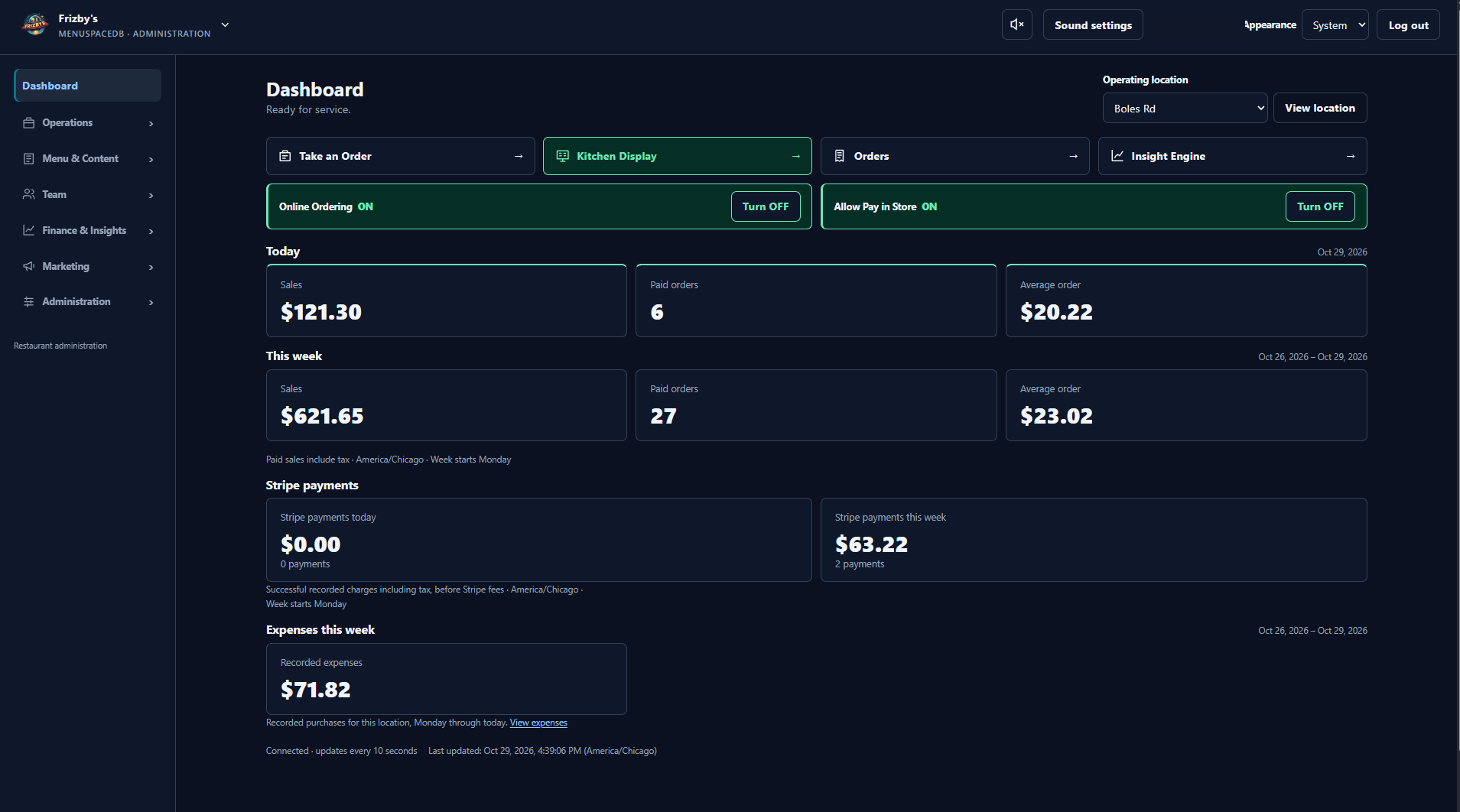
MenuSpace Pro dashboard showing sales, orders, and expenses
Actual MenuSpace Pro dashboard, previously branded V3. This screen represents Pro, not Mobile or Go.
Three products. Real food businesses.

Start with what you need.

Choose the tools that fit the way you operate. Each MenuSpace product has a purpose of its own.

Feature overview · Mobile screenshot still needed

Location-first food businesses

MenuSpace Mobile

For food trucks, concession trailers, lunch wagons, pop-ups, market sellers, and temporary food stands.

Let customers find you, browse your menu, and order ahead. Manage your location and incoming orders from one simple dashboard.

  • Customer-facing map and operator location updates
  • Online pickup ordering
  • New, Working, and Ready kitchen workflow
Explore MenuSpace Mobile →
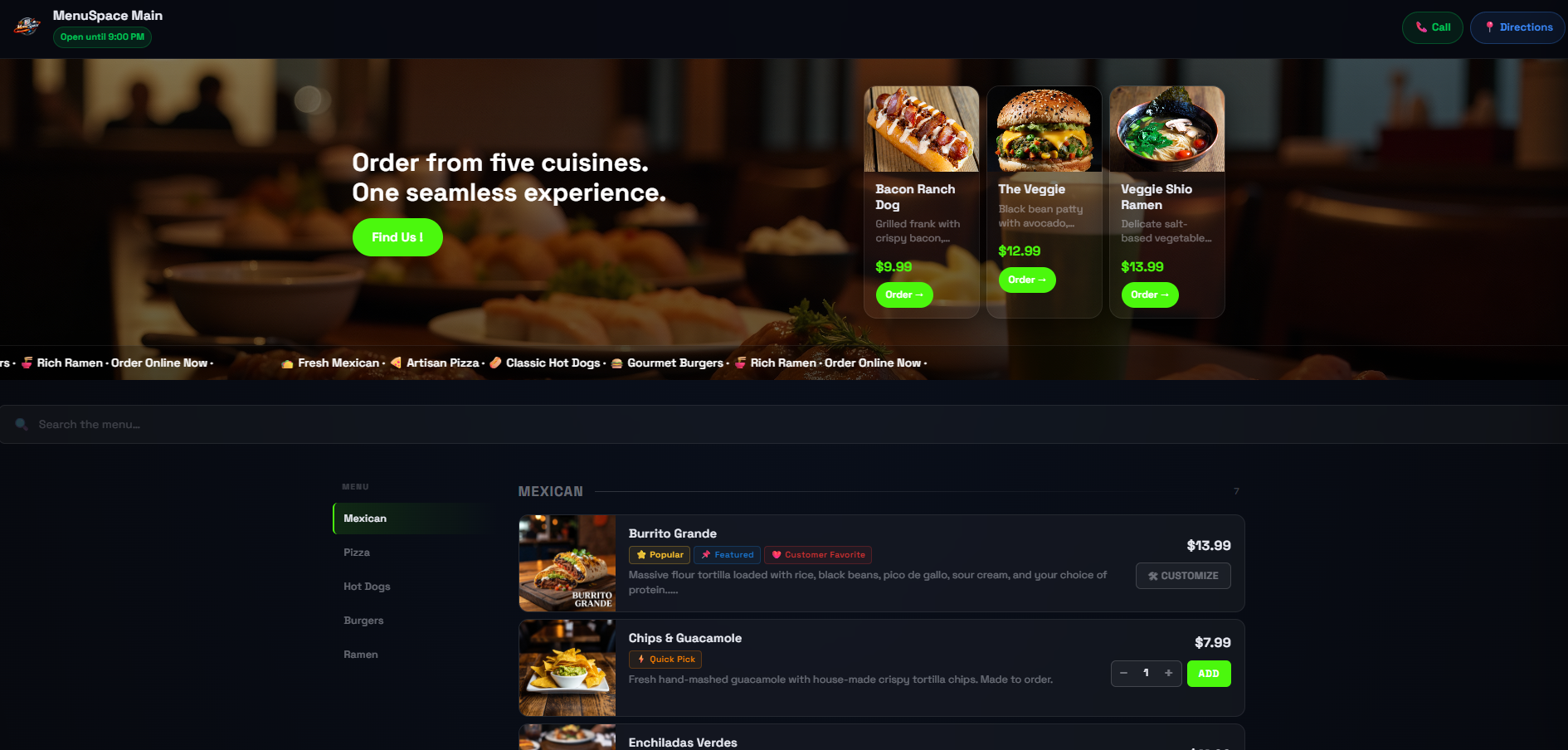
Existing MenuSpace Go / Legacy storefront with menu categories, food photos, prices, and order controls

Existing Go / Legacy storefront · View full image

Database-free restaurant management

MenuSpace Go

For small restaurants, cafés, sandwich shops, food trucks, and independent food businesses.

Manage your menu, take online orders, use digital signage, and share your location with a complete restaurant platform that runs without a database.

  • Database-free restaurant management
  • Online ordering and kitchen order management
  • Digital signage
Explore MenuSpace Go →
Actual MenuSpace Pro dashboard with sales, order, and expense summaries

Actual Pro dashboard · View full image

Restaurant operations and deeper insight

MenuSpace Pro

For food businesses that want comprehensive management and a closer view of operational and financial performance.

Connect daily restaurant operations with promotions, advanced analytics, and Insight Engine reporting in our database-driven platform.

  • Menu management and online ordering
  • Advanced analytics
  • Insight Engine financial and operational reporting
Explore MenuSpace Pro Features →
Our story

Built Behind the Counter.

MenuSpace began in an independent sandwich shop, with an owner solving the problems in front of him.

“I needed practical tools for my own restaurant.”

It started with a menu on a television, loaded from a USB drive. I built a dynamic online menu so customers could see what we served. As the restaurant developed, I added online ordering, then tools for the kitchen, promotions, analytics, and financial reporting.

Over roughly two years, MenuSpace grew one problem at a time, alongside the business. I still operate the restaurant. Now those solutions are available to other independent food businesses.

  1. A TV and a USB driveA simple way to show the menu inside the shop.
  2. A menu onlineLet customers see the food before they visit.
  3. Online orderingGive customers a way to place an order.
  4. Tools for the working dayKitchen management, promotions, analytics, and reporting.
  5. Tools to sharePractical products for other independent operators.
Grow at your own pace

A fit for your business, today.

There is no required upgrade path. Choose Mobile, Go, or Pro for the work you need to do.

Mobile

Sell wherever you set up.

Location-based selling, pickup orders, and a straightforward kitchen workflow.

See Mobile →
Go

Bring daily tools together.

Broader restaurant management, online ordering, signage, and mapping, without a database.

See Go →
Pro

Understand the bigger picture.

Comprehensive operations with advanced analytics and financial insight.

See Pro →
How MenuSpace Works

Built for the Rush.
Simple Enough for Anyone.

Clear controls, familiar browser screens, and a dashboard that brings you back to home base. See how MenuSpace fits a real restaurant's working day.

01 · Learn the everyday tools

Picture. Description. Price.

Routine menu updates use familiar controls and don't require programming.

02 · Use compatible equipment

Start with what you have.

See the computers, televisions, and printing setup used at Frizby's, and what to check for your own setup.

03 · Make sense of hosting

A place for your software.

Understand domains and hosting in plain English, after you know what the software does.

Choose the product first

Find your fit before your plan.

Product pricing and hosting terms will be published once confirmed. Compare the tools each product offers, then choose what fits your operation.

Existing customers

Looking for your MenuSpace account?

MenuSpace Legacy is now publicly named MenuSpace Go. Your existing account, license, and download access remain in the customer portal. Older download names may still say Legacy.
Practical software for real food businesses

Your business. Your menu. Your space.

Explore the three products and start with the tools that make sense for you.

Frequently asked questions

Do I need to know how to code?

No programming is needed for routine menu management. Adding a picture, description, and price uses familiar controls. Initial installation and hardware setup are separate tasks and may need help.

What is hosting?

Hosting is the place online where your website and MenuSpace software run. You can rent hosting space; you do not necessarily need to own a physical server.

What is a domain name?

It is the address customers type to reach your website. The domain is the address; hosting is where the website runs.

Do I need a special computer?

Ordinary administration uses a web browser on compatible equipment. A proprietary computer package is not required. Check the requirements for your chosen product and setup.

Can I use my own televisions?

Go and Pro support digital menu displays with compatible equipment and configuration. At Frizby’s, the owner uses ordinary TVs and wireless HDMI adapters. Check your particular equipment before buying.

Can MenuSpace print receipts?

Go and Pro support receipt printing with compatible printers and appropriate configuration. Go originally introduced the Linux receipt-printing bridge. Compatibility depends on your setup.

Can it open a cash drawer?

Go and Pro support cash drawer operation with compatible hardware and the right configuration. Check the drawer and printer connection requirements; not every setup will work.

What happens if I get lost in the menus?

Use the Dashboard button to return to your familiar home base, then open the everyday task you need from there.

What’s the difference between Go and Pro?

Go provides database-free restaurant management with POS, ordering, kitchen tools, receipt printing, signage, mapping, and straightforward sales reporting. Pro is database-driven and adds advanced analytics, Insight Engine reporting, and enhanced signage tools.

Can I start with one product and choose another later?

You can consider a different product as your needs change. There is no required upgrade sequence. Check setup, purchase terms, and data-transfer options before changing; automatic migration is not promised.

Which MenuSpace product fits my business?

Mobile focuses on location-based selling and simple pickup-order management. Go brings database-free restaurant tools together. Pro adds deeper operational and financial insight. Choose the product that fits your needs; there is no required upgrade path.

Is online ordering only available in Pro?

No. Mobile, Go, and Pro all offer online ordering and kitchen order tools. Mobile uses a New, Working, and Ready workflow for pickup orders.

What happened to MenuSpace Legacy and V3?

MenuSpace Legacy is now marketed as MenuSpace Go. MenuSpace V3 is now marketed as MenuSpace Pro. Existing Go customer accounts, licenses, and downloads continue through the customer portal; older names may remain in downloads.

Which products include signage and business reporting?

Go and Pro include digital signage. Go offers straightforward sales reporting. Pro adds advanced analytics and Insight Engine financial and operational reporting. These tools are not advertised as Mobile features.

Are hosting and pricing the same for every product?

No shared hosting or pricing terms should be assumed. Pro supports hosted and self-hosted installations. Product-specific pricing and other hosting details will be published when confirmed.

Where can existing customers access their accounts?

Use the Customer Portal link in the footer for existing account, license, and download access.

Customer Portal →